Resource Cache
How KeenAgents keeps your configuration ready to serve — always current, and the controls for the rare time you want to force it.
What It Is
A ready-to-serve copy of your organization's configuration.
Every admin page and every partner site reads the same thing: your organization's configuration — Roles, Spaces and the Agents inside them, API Keys and their Clients, Certificates, Consumer Contracts, and each contract's consumer policy. KeenAgents keeps a ready-to-serve copy of that configuration so those reads are instant and never wait on a slow lookup. You do not create or manage this copy — it exists so the product feels immediate.
The one guarantee that matters: the served copy is kept current for you. The moment you create, edit or delete a space, agent, API key, client, certificate or contract — or bind or unbind one — the copy updates: the next page load and the next partner fetch see the change, with no step on your part. Two exceptions: the Roles copy, and a Webhook entry's own fields (name, origin, URL), refresh only when you press Rebuild (a webhook's fields also refresh when you save the API key that binds it). The controls on this page exist for those cases and for the rare time you want to force a refresh yourself.
Why It Behaves This Way
- Always current
- A change you make is reflected right away — there is no refresh interval to wait out. Saving an agent, rebinding an API key or editing a contract is visible to admins immediately, and to partner sites on their next fetch.
- Tenant isolation
- A partner only ever receives the resources bound to its own API key — its spaces, its agents, its contract and policy. One tenant can never read another's configuration; the served copy is filtered to the caller every time.
- Self-healing
- The served copy cannot drift from the truth for long: it is re-checked on a steady cadence and after any interruption, so even in an edge case it settles back to what your records actually say. You should never need the manual controls below to keep it correct — they are a convenience, not a repair.
The Manual Controls
Three ways to act on the served copy — all gated by the cache permission.
Every control below is gated by a single permission: cache for read (see status), cache:w for write (rebuild or clear). Without the write grant the action buttons do not appear.
- The Cache page (System → Cache, titled Cache Management) — four resource cards: Roles, Agents, Spaces and Api Keys, each with a Manage button. The resource page it opens shows the copy's live status — State (Idle / Creating… / Invalidating… / Failed, with the staged/total count while a job runs), Present (Yes / No), Last created, Entries, Size, Last changed by and Last changed at, plus a Refresh Status button — and two actions: Create (build a fresh copy and swap it in — readers see the old copy or the new one, never a half-built mix) and Invalidate (clear the copy; it is rebuilt on the next change or Create). Only one job runs per resource at a time; a second click while one is running is refused with
Cache busy: a creating job is already running for <resource>. The Clients, Certificates, Contracts and consumer-policy copies have no card here — they are rebuilt from the record's own page (below). - The Rebuild Resource Cache button — on the detail page of every record that has a served copy (Api Key, Client, Certificate, Contract, Webhook, Space, Agent). On a Client, Certificate, Contract, Webhook, Space or Agent it rebuilds that record's whole resource without a trip to the Cache page — and for Clients, Certificates and Contracts it is the only place to do so. A Contract rebuilds both its contract data and its consumer policy; a Webhook rebuilds the API-key data its details live on.
- The Api Key's Rebuild Resource Cache button — the same button, but on an API key it is a cascade over everything bound to that key. See Refreshing Everything a Partner Reads below.
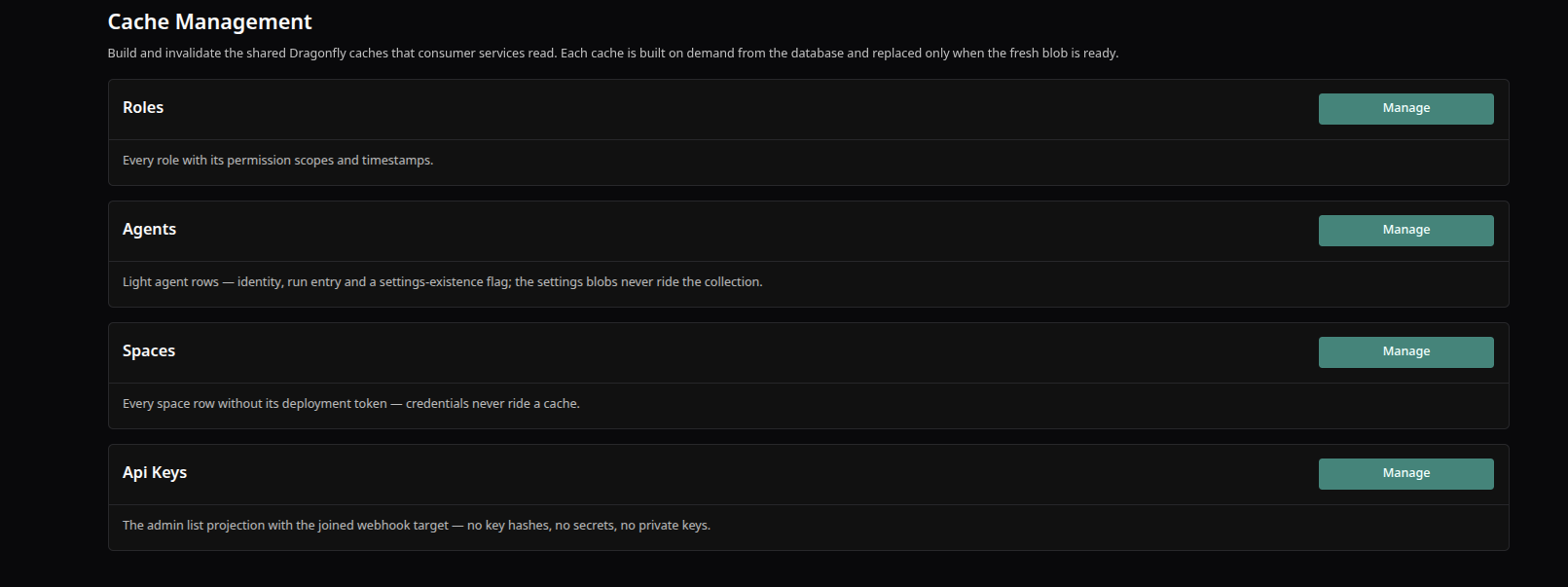
The Cache page — four resource cards (Roles, Agents, Spaces, Api Keys), each opening a Manage page with the copy's status and the Create / Invalidate actions.
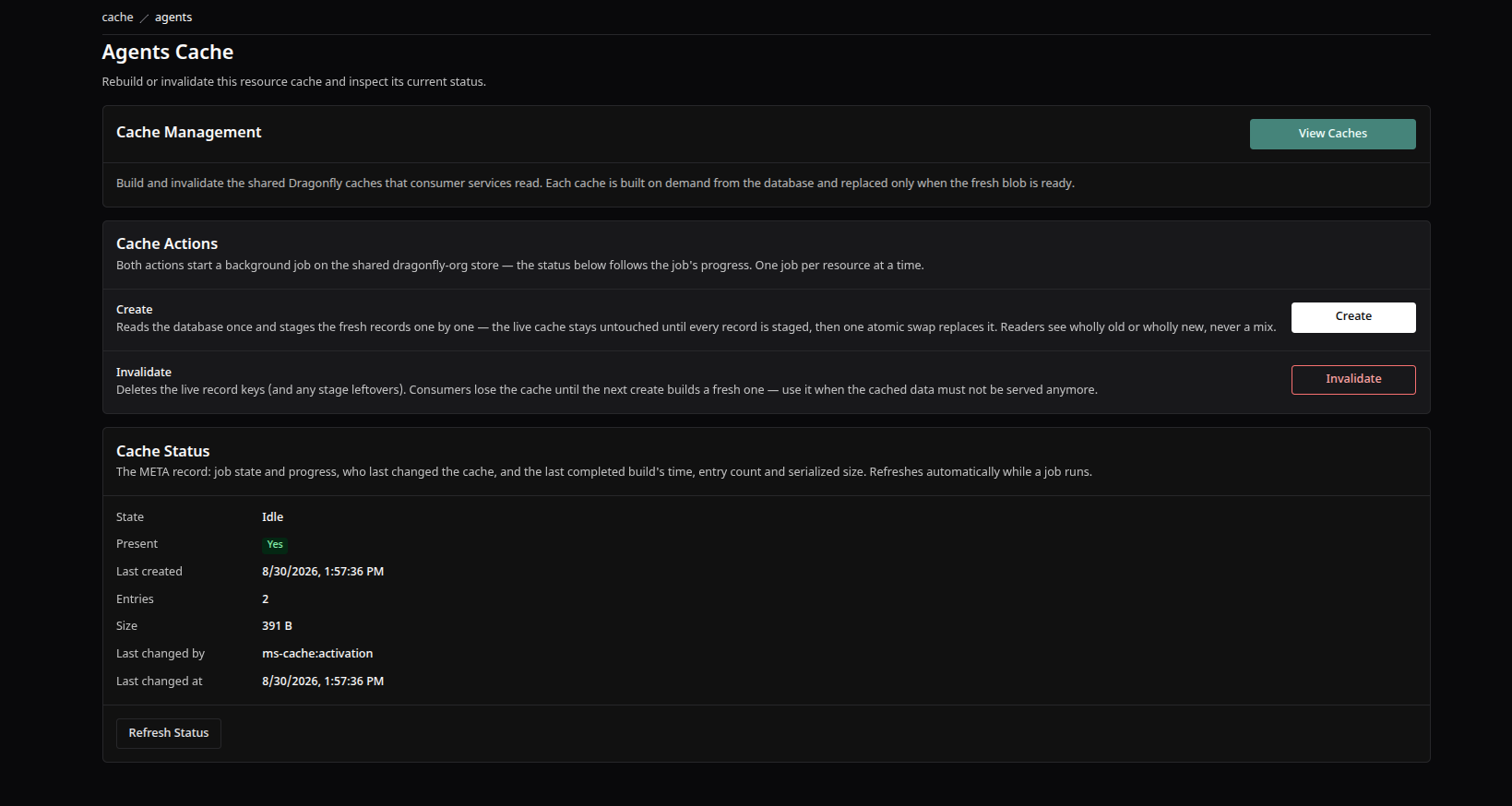
An example resource card — the served copy of your agents, with its record count and last-built status.
Refreshing Everything a Partner Reads
The Api Key's Rebuild Resource Cache button is a cascade — one click, then Wake.
A partner reads everything through its API key, so the key's own Rebuild Resource Cache button follows the bindings out to every piece the partner will fetch and refreshes exactly those: the key itself, its certificate, its client, its consumer contract, that contract's consumer policy, the contract's spaces, and the agents in those spaces. Nothing else is rebuilt or cleared — other partners' records are left untouched. You never have to remember which of seven pages to visit.
The cascade needs a fully configured key: its client, certificate, contract and webhook must all be bound as saved (a picker you changed but have not saved does not count). Otherwise it is refused with API key not found or not fully configured — bind its client, certificate, contract and webhook, then rebuild. and nothing is touched. On success the confirmation reads Bound caches rebuilt — now Wake to push them to the partner — and Wake is the next click: the rebuild refreshes the served copy, Wake tells the site to re-read it.
- Open the partner's key under Api → Api Keys. Confirm it is fully bound and saved.
- Click Rebuild Resource Cache and wait for Bound caches rebuilt — now Wake to push them to the partner.
- Click Wake. The partner site re-fetches the freshly rebuilt set.
An AI agent connected through the Keen MCP Server can run the same routine — its rebuild api-key caches tool followed by wake api key — with the same cache-write and API-key-write permissions on its role. For what the partner site does with the notice, see Connecting a Site.
When To Use Them
Almost never — here is the short list.
- Never, for a normal edit of a space, agent, API key, client, certificate or contract. Those saves already refresh the served copy on their own. Reaching for Rebuild after such a Save is redundant. (Roles and a Webhook entry's own fields are the two records whose copy refreshes only on Rebuild.)
- To refresh what one partner reads — after a batch of changes to anything bound to a partner's key, or when a partner reports stale configuration: open the partner's Api Key, click Rebuild Resource Cache (the cascade), wait for Bound caches rebuilt — now Wake to push them to the partner, then click Wake. Rebuilding alone does not tell the site anything — Wake is what makes it re-read. For a single resource you are unsure about, rebuild it from its own page or the Cache page and re-check its status.
- To clear a copy on purpose — Invalidate removes the served copy so nothing is served until the next build. Use it deliberately; a partner reading that resource in the gap gets an empty result until the copy is rebuilt.
For Partner Sites
How the data your integration fetches stays fresh.
A partner site reads its configuration — spaces, agents, contract, policy, agent front settings — over the authenticated API, served from the same ready-to-serve copy. Because that copy is kept current, a change an admin makes is reflected the next time the site fetches. To avoid polling, KeenAgents notifies the site on its own when its API key, client, certificate or contract changes: a small notice is POSTed to the site's webhook URL and the site re-fetches the affected resources. Changes to a space, an agent or an agent's front settings send no notice — that is what the admin's Wake button on the API key is for: it re-sends the certificate material and tells the site to re-read everything the key grants (its key and contract resources, consumer policy, spaces and agents, and agent front settings). The notice carries no data — it is a hint to re-read (notify-then-fetch).
Kept fresh:
spacesagentscontractpolicyagent front settingsWake lives on the API key's detail page. It is enabled only when the key is fully bound and saved — a disabled Wake explains why on hover (Bind a certificate before waking this key. / Save your changes before waking this key.). On click it re-sends the certificate material and tells the site to re-read its key and contract resources, consumer policy, spaces and agents, and agent front settings; the confirmation names the URL it was delivered to (Woken — delivered to …). A notice is delivered once, without retries — if the site's endpoint is down, the site picks the change up on its next fetch or the next Wake.
Deleting a record removes just that record's entry from the served copy — no whole rebuild. Deleting a client, certificate or contract also refreshes the API-keys copy (the key it was bound to is now unbound); deleting an API key sends the partner a final notice so it re-reads and discovers the revocation.
Keen Agents 2026
Documentation
Release 15