Webhooks
A named pairing of a partner's browser Origin and its notification URL — the address side of the API access chain.
What a Webhook Entry Is
Where a partner's requests come from, and where its notifications go.
A webhook entry is a standalone resource with three fields: a name, the partner's browser Origin, and the partner's notification URL. It answers the two address questions of a partner integration in one record: which web origin the partner's application calls from (the inbound side), and where KeenAgents delivers refresh notices to the partner's server (the outbound side).
A webhook entry does nothing on its own — an API key points at it, the same way a key binds its Client, Certificate and Contract. Origins are unique across your organization's webhook entries, so an inbound request's Origin header always resolves to exactly one entry, and through it exactly one API key and the rest of that partner's chain.
Core Concepts
- Origin
- The exact
scheme://host[:port]the partner's browser application runs on — no path, no trailing slash — so it matches the browser's Origin header byte for byte. The port matters (browsers omit only the default 80/443), wildcards are not supported, and the value is unique across all webhook entries. Together, the origins of every fully bound key form the organization's Origin allow-list. - Notification URL
- A full
http://orhttps://URL on the partner's server. Refresh notices land here: lightweight POSTs that say something changed — never the data itself, with one exception: certificate deliveries (after a code claim or a Wake) carry the public PEM and the shared secret key. On receipt of a notice the partner re-fetches what it needs over its authenticated API connection (notify-then-fetch), so a missed notice costs nothing that the next fetch does not recover. - API key binding
- Set from the API key side — the "Pick a webhook" dropdown on the key form. A webhook entry can be bound to at most one API key at a time. The binding is one of the four an API key needs to be fully bound; without it the key's partner has no allow-listed origin and no address for notices, so it cannot reach the platform.
- Wake
- The admin action, available on a fully bound and saved API key, that sends the entry's notification URL the certificate material and then one refresh notice naming every resource to re-read. Use it after you finish or change a partner's wiring — press Rebuild Resource Cache first — so the partner re-fetches its configuration instead of waiting to discover the change.
Rules & Limits
- Name: required, up to
100characters, unique — it is how the entry appears in the API key form's picker. - Origin: required, up to
200characters, in the formscheme://host[:port], unique across all webhook entries. Exact-match only —https://app.example.comandhttps://app.example.com:8443are different origins. - Notification URL: required, up to
500characters, a full URL starting withhttp://orhttps://, and also unique — two entries cannot share a URL. A duplicate of any of the three fields is refused with Name / Origin / Webhook URL "…" is already in use by another webhook. - Binding: at most one API key per entry. On the key form a new pick re-binds, clearing the selection unassigns, and leaving the field untouched keeps the current binding.
- A webhook entry that a key holds cannot be deleted — the console answers Webhook "…" is bound to an api key. Unbind it there first. Pick "— No webhook —" on the key's form, Save, then delete the entry. An unbound entry deletes like any other record.
- Saving an entry's name, Origin or notification URL updates the record at once, but what partners see follows the API key that holds the entry: after editing a bound entry, open that key and press Rebuild Resource Cache (or simply Save the key), then Wake. Until then the old Origin is the one allow-listed and the old URL is the one notified.
Receiving Notices
What a partner endpoint should do with a refresh notice.
- Accept the POST quickly and respond with a success status — treat it as a doorbell, not a delivery.
- Re-fetch the affected data through your authenticated API connection. The notice itself carries no payload to act on — this is deliberate, so a notification endpoint never becomes a place where data can leak or be spoofed.
- Design the endpoint to be idempotent: notices are best-effort and delivered once, without retries, and a re-fetch after a duplicate or missed notice always converges on the same state.
The Notice Payloads
Exactly what KeenAgents POSTs to your notification URL — the request you receive, and how to answer it.
KeenAgents is the caller here: it POSTs to your notification URL. Every notice is POST with Content-Type: application/json and a body whose synch-data field names what changed. Two shapes exist — the ordinary refresh notice (an array of change kinds, no data) and the certificate delivery (after a code claim or a Wake; it carries the material). There is no authentication header on the notice; it is a doorbell, and the value lives behind your own authenticated re-fetch, never in the notice itself.
Paths shown as /v1/… are reached at https://<your KeenAgents host>/keen-api/… — the /v1 prefix is replaced by /keen-api.
Refresh notice — the ordinary case (no payload)
POST <your notification URL> Content-Type: application/json { "synch-data": [ "r_api_keys" ] } // a Wake sends TWO POSTs: first the certificate delivery (next block), // then one batch naming every list to re-read: { "synch-data": [ "r_api_keys", "r_consumer_policy", "r_space", "r_agent", "r_json" ] } // the same batch is sent once more, without the certificate, when your key is deleted // you respond fast with any 2xx — the body is ignored: → 200
The synch-data kinds tell you which authenticated read to make next:
r_space·r_agent- Carried only in a Wake (or in the final notice when your key is deleted): re-read
GET /v1/space/list. That list is the organization's whole space collection with the agents nested in each space — keep only the spaces named in your consumer contract'sspaces; chat runs outside them are refused. Space and agent edits do not send a notice of their own — the admin presses Wake. r_consumer_policy- Your contract or its policy changed (name, key, spaces, defaults or policy) — re-read
GET /v1/resources/consumer-contractandGET /v1/resources/consumer-policy. Ar_consumer_policy_deletemeans the contract was removed — drop your stored copy; your key is no longer fully bound until the admin binds a new one. r_json- An agent's partner-facing front settings should be re-read:
GET /v1/resources/agent-front-settings?agentId=<slug>for each agent you use. It arrives only in a Wake batch — saving front settings does not send a notice on its own, the admin presses Wake. r_api_keys- Your key or its client changed (a key edit or rotation, a client rename, rotation or deletion): re-read your consumer contract and policy, and expect a new application token to be needed if the credentials you hold were rotated.
r_cert·r_cert_deleter_certcomes in two shapes: as a bare array entry ({ "synch-data": ["r_cert"] }) when the admin renames, edits the shared secret of, or rotates your certificate — then re-run the code handshake or ask for a Wake; and as the one notice that carries a payload (next block) after a handshake claim or a Wake.r_cert_deletemeans the certificate was deleted — clear your stored copy; your key is no longer fully bound until the admin binds a new one.
Certificate delivery — the one notice that carries data
POST <your notification URL>
Content-Type: application/json

{
  "synch-data": "r_cert",            // a bare string here, not an array
  "type": "resource",
  "result": {
    "cert": "-----BEGIN PUBLIC KEY-----\n…\n-----END PUBLIC KEY-----",
    "key":  "<shared secret>"        // "" when the admin never set one
  }
}

→ 200
This lands after you claim a certificate code (see Connecting a Site) and every time an admin presses Wake on your key. A rotation alone sends only the bare r_cert notice — run the handshake again or ask for a Wake to receive the new material. Store result.cert (the public key you verify KeenAgents-issued tokens with) and result.key (the shared secret) when it arrives; it is not one-time-forever.
Delivery semantics & failure modes
- Once, no retries
- Each notice is best-effort and sent once. Answer within 5 seconds with any 2xx — a slower or failing endpoint, or an unreachable URL, is logged on the KeenAgents side and not retried. Make the endpoint idempotent and fast — a re-fetch after a duplicate or missed notice always converges on the same state.
- A missed refresh notice
- Costs nothing the next fetch does not recover, because the notice carries no data. Your configuration is simply stale until your next authenticated read.
- A missed certificate delivery
- Is recoverable — unlike a refresh notice, it carried the material, but re-running the code handshake (or the admin pressing Wake) re-delivers it to the same URL. Never expose the shared secret to the browser.
In the Admin UI
- Webhooks are their own entry in the sidebar's Api group, with list, create and detail pages, gated by the Webhooks scope — read to view entries, write to create, edit or delete them.
- The create and detail forms carry the three fields: name, Origin and notification URL.
- Binding happens on the API key form via the "Pick a webhook" dropdown, which offers unassigned entries plus the currently bound one on Edit.
- The Wake button lives on the API key's detail page and is available only while the key is fully bound and saved.
- A Rebuild Resource Cache button in the footer rebuilds the served copy of the API keys (an entry's Origin and URL are served through the key that holds it — there is no separate webhooks copy). It appears only for roles with Cache write. Use it — or the bound key's own Rebuild — after editing a bound entry, then Wake the key.
- Also available to an AI agent through the Keen MCP Server:
list_webhooks,get_webhook,create_webhook,update_webhook,delete_webhook— same scope, same rules.
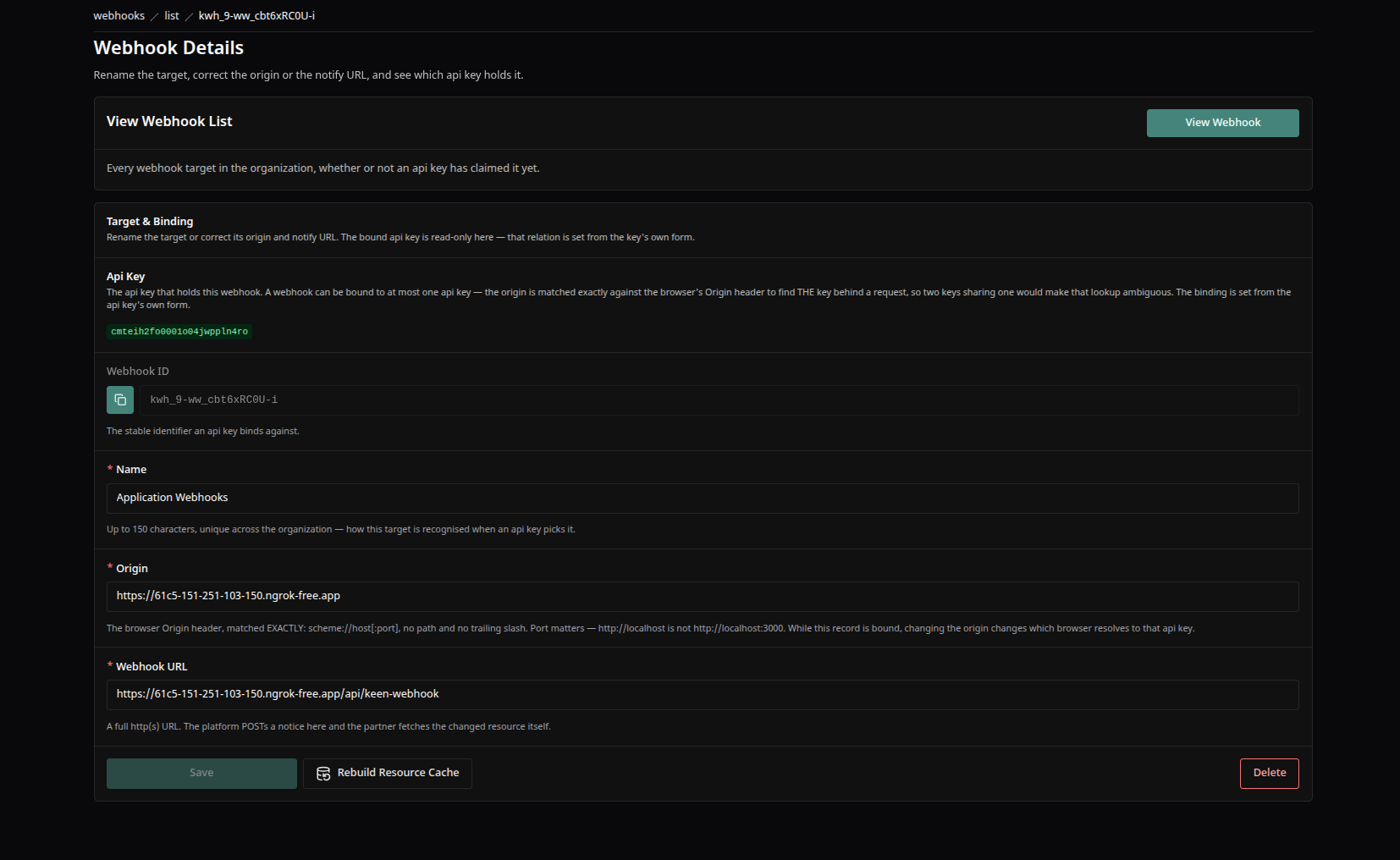
A webhook entry's detail screen — the key holding it, its Webhook ID, name, the partner's browser Origin, the notification URL, and the Save · Rebuild Resource Cache · Delete footer.
Good to Know
- A rejected Origin produces no error at all — KeenAgents simply drops the connection, so the caller sees a connection reset or a generic proxy error on its side. This is deliberate: an unknown caller learns nothing from the refusal. It looks like an outage but is the allow-list working.
- A partner seeing "silent drops" from a page that used to work usually moved origins — a staging domain, a new port, an http/https switch. Update the webhook entry's Origin to the page's real origin, then Rebuild and Wake the bound key.
- Changing the Origin or the notification URL of a bound entry redirects every future notice and certificate delivery — coordinate with the partner first, then on the bound key press Rebuild Resource Cache and Wake so the new address is live and the partner confirms it works.
Keen Agents 2026
Documentation
Release 15