Certificates
Per-tenant signing certificates — your partner verifies consumer tokens with the public PEM; the private half never leaves the platform.
Overview
What a certificate is and why every partner chain needs one.
A certificate is the per-tenant signing identity of the API access chain. KeenAgents generates the keypair for you: the platform signs your partner's consumer tokens with the private half, and the public certificate (PEM) is what your partner application uses to verify them. A certificate is bound 1:1 to at most one API key, and it is one of the four bindings a key needs to be fully bound: until a certificate is bound, the key's Origin never joins the partner-facing allow-list and an application-token request is refused with the uniform 500 Invalid request — the reason is visible only to the admin, on the key's detail page.
Visibility is split on purpose: the public PEM is always visible in the admin UI, while the private key is never displayed and can never be read back through any API or UI surface — that guarantee is what makes the public PEM safe to share. Certificates are self-issued for your tenant with a one-year validity, so partners should trust the PEM they receive directly (pin it) rather than expect a public certificate-authority chain, and you should plan a rotation before expiry.
Anatomy of a Certificate
- Key material
- A signing keypair generated entirely by KeenAgents — you never upload key material. Expect the create and rotate actions to pause for a few seconds while the new keypair is generated.
- Public certificate
- The PEM is always shown on the detail page for copy/paste. Partners do not download it from an API — it is delivered to their webhook entry's notification URL, by the certificate-code handshake or by an admin pressing Wake on the bound key — so delivery always lands on the URL your organization registered.
- Private key
- Held by the platform and used only to sign your partner's consumer tokens. It is never displayed, never delivered to anyone, and can never be read back through any API or UI surface — if it must change, rotate; there is no export.
- Secret key
- An optional admin-supplied shared secret (
16–32characters) used to encrypt consumer material that both KeenAgents and your partner must be able to read. Because both ends need the same value, it stays visible on the detail page — recoverable by design, unlike reveal-once secrets. It is an independent credential: rotating the keypair does not change it, and vice versa. - API key binding
- Set from the API key side via the "Pick a certificate" dropdown; a certificate can be bound to at most one API key. Deleting a certificate does not delete the key — the key simply loses its certificate binding and silently stops being fully bound until a new certificate is bound.
Rules & Limits
- Name: required,
1–100characters, unique. - Org-wide cap:
20certificates, checked on create only. Past the cap the create fails with400and a "Reached the maximum number of …" message — delete one first. - Secret key:
16–32characters (trimmed). Leave the field empty on create to store no secret — the list shows Unset. On the detail page an emptied field is ignored (the stored key stays); to change it, enter a new 16–32 character value or press Generate, then Save. Omitting the field on an update leaves it untouched. There is no "clear" action — to drop a secret entirely, replace the certificate. - Rotation replaces only the key material and the public PEM. The certificate keeps its identity, its API key binding, and its shared secret key — so nothing needs re-wiring after a rotate.
- Delete permanently destroys the certificate and its private key, and unbinds it from the API key. There is no undo and no recovery of the key material.
- Permissions: certificates have their own Certificates scope — read to view certificates and their public keys, write to create, rename, edit the shared secret, rotate or delete. Binding a certificate to a key is done on the API key form (API Keys write).
- Propagation: changes take effect immediately — a create, rotate, or delete is live across the platform right away.
Rotation & Deletion
Rotate swaps the keypair in place; delete tears the whole thing down.
- Admin presses Rotate in the Rotate Key Material block on the certificate detail page and confirms (Confirm rotate).
- KeenAgents generates a fresh keypair (expect a pause of a few seconds). The certificate's identity, its API key binding, and the shared secret key are all unchanged — only the key material and the public PEM are new.
- The old private key is destroyed the moment the new one exists — there is no two-key overlap window. Tokens signed with the old key remain verifiable only by parties still holding the old public cert.
- The partner's notification URL automatically receives a bare
r_certnotice (no material). The partner then either re-runs the code handshake, or the admin presses Rebuild Resource Cache and Wake on the bound API key — Wake delivers the new public certificate and the shared secret key directly.
Delete (as opposed to rotate) permanently destroys the certificate and its private key, and unbinds it from the API key — the key stops being fully bound, so its Origin drops off the partner-facing allow-list and the partner loses access until a new certificate is bound.
Certificate-Code API — Request, Response & Failures
The two HTTP calls behind the handshake: issue a one-time code, then claim it. Both carry the partner's application token.
Every call is gated on an allow-listed Origin and the partner's Authorization: Bearer <application_token>. The client_id query must equal the client the token was minted for.
Paths shown as /v1/… are reached at https://<your KeenAgents host>/keen-api/… — the /v1 prefix is replaced by /keen-api.
GET /v1/resources/certificate — issue a code
- Method & path
GET /v1/resources/certificate?client_id=kcid_…- Headers & body
Origin(allow-listed) andAuthorization: Bearer <application_token>. Queryclient_idrequired; no request body. A re-issue against the same key overwrites the previous code and restarts the 120 s window.
200 — code issued
200 OK { "success": true, "status": 200, "message": "Success", "result": { "code": "<one-time code — opaque, single-use, valid 120 s>" } }
Failure modes — GET
- No response. This route is a silent surface: an unlisted Origin, a missing or unknown
client_id, a missing or invalid token, a revoked key, or aclient_idthat doesn't match the token — every failure drops the connection with no status and no body, surfacing as a connection reset or a generic proxy error on your side. A probing scanner never even confirms the route exists. Recover by fixing the credential and retrying; the specific cause is never disclosed.
POST /v1/resources/certificate — claim the code
- Method & path
POST /v1/resources/certificate?client_id=kcid_…- Headers
Origin(allow-listed),Authorization: Bearer <application_token>, andContent-Type: application/json.- Body
code— string, required: the code returned by the GET issuance. Extra fields are rejected.
POST /v1/resources/certificate
POST /v1/resources/certificate?client_id=kcid_… Origin: https://app.yourcompany.com // must be allow-listed Authorization: Bearer <application_token> Content-Type: application/json { "code": "<the code returned by the GET issuance>" } 200 OK { "success": true } // the redeem webhook fires server-side, in parallel
On 200 { "success": true } the code is consumed and the redeem webhook is dispatched to your registered URL in parallel — the success reply means the delivery went out.
Failure modes — POST
- no response
- The
Originis not allow-listed — the connection is dropped before authentication and surfaces as a connection reset or a generic proxy error on your side. - 401
- Missing or malformed
Authorizationheader, or an invalid / revoked token —Invalid token. Also returned (as{ "success": false }) when theclient_idis missing or doesn't match the token, when thecodeis wrong, expired, or already claimed, or when the API key ↔ client binding no longer holds. Codes are single-use, so a replay always fails — recover by requesting a fresh code with a GET and claiming that. - 400
- The body is missing
code, sends it empty, or includes unknown fields — rejected with the validation reasons. Send exactly{ "code": "…" }.
In the Admin UI
- Certificates are their own entry in the sidebar's Api group, with list, create and detail pages, gated by the Certificates scope.
- Unlike API keys and client secrets, nothing here is reveal-once: the public PEM is always visible on the detail page (textarea + copy button), and Rotate reveals the new PEM.
- The create and detail forms include the optional shared secret-key field (
16–32characters) with a Generate button; the value is displayed on the detail page — it is recoverable by design. On create the field reads Leave empty to store no secret; on the detail page, Leave empty to keep the current key. - Delete is two-step — Delete arms it, then Confirm delete / Cancel; the private key is destroyed along with the certificate. Rotate sits in its own Rotate Key Material block and also confirms (Confirm rotate / Cancel).
- Binding happens on the API key form via the "Pick a certificate" dropdown, which offers unassigned certificates plus the currently bound one on Edit.
- A Rebuild Resource Cache button in the footer rebuilds the served copy of all certificates (the Cache page has no card for certificates — this button is the only place to do it). It appears only for roles with Cache write. You rarely need it — a save refreshes the copy on its own; to refresh everything one partner reads, use the API key's Rebuild Resource Cache (the cascade) and then Wake.
- Also available to an AI agent through the Keen MCP Server:
list_certificates,get_certificate,create_certificate,update_certificate,rotate_certificate,delete_certificate— same scope, same rules.
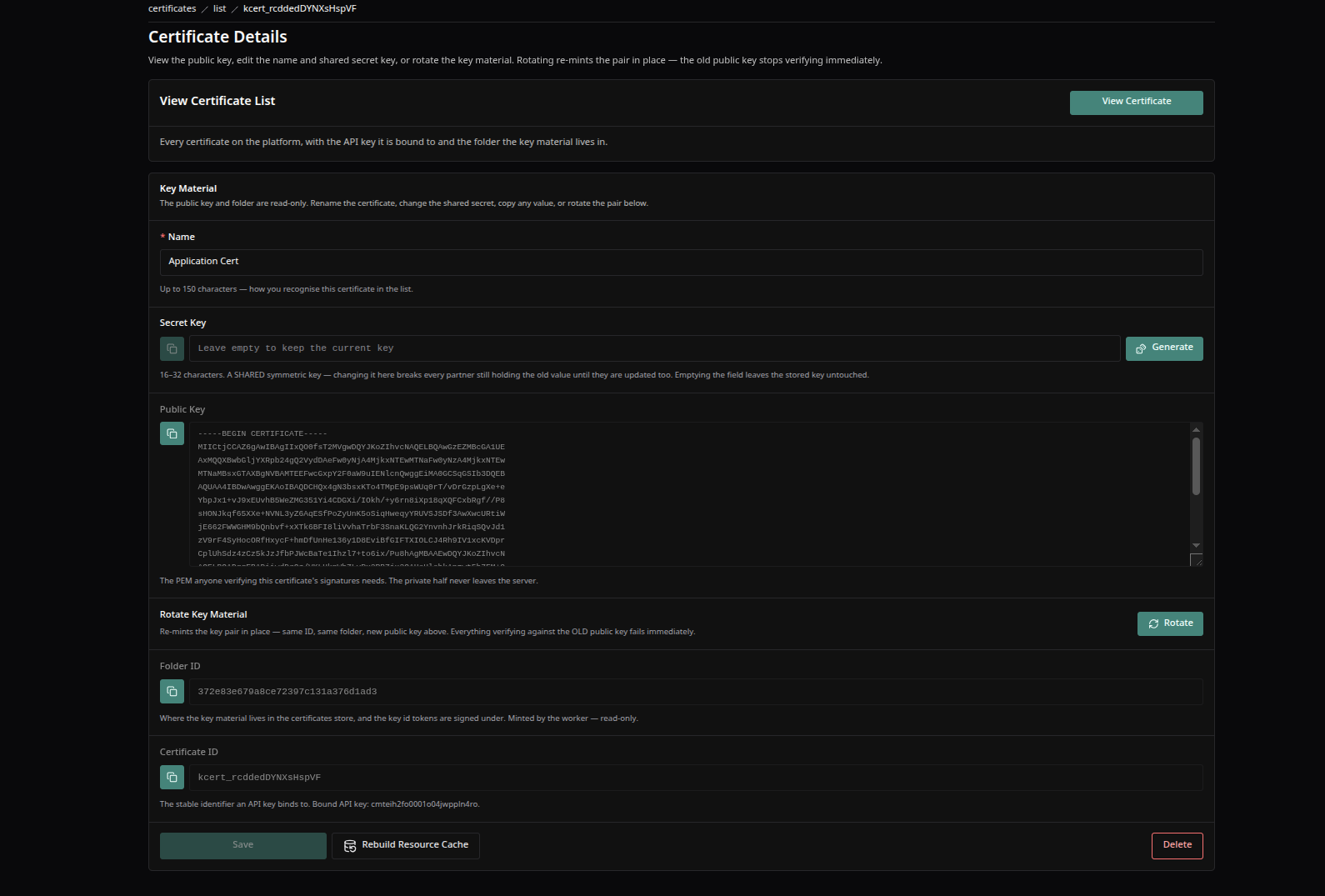
A certificate's detail screen — the name and shared secret key with its Generate button, the always-visible public PEM, the Rotate Key Material block, and the Save · Rebuild Resource Cache · Delete footer.
Good to Know
- Renaming a certificate, changing its shared secret, or rotating it sends the bound key's notification URL a bare
r_certnotice; deleting it sendsr_cert_delete. Neither carries material — the partner re-runs the handshake or the admin presses Wake. - The material itself travels only by the handshake delivery and by Wake — never in a response to a request. If a partner reports it has no certificate, run one of the two; there is nothing to copy out of the admin except the public PEM.
Keen Agents 2026
Documentation
Release 15