Flows & Runtime
What an agent actually runs: a flow of nodes, executed one node at a time in isolated sandboxes, at scale.
What a Flow Is
The runnable graph behind every agent.
Behind every agent is a flow — a graph of nodes that the platform walks one node at a time. Each node does one small job and hands off to the next: call a language model, run a piece of your own code, branch on a condition, or fan work out and join it back together. The agent record you manage in the console simply names where a flow starts (its run entry); the flow itself is the deployed project that does the work.
You author flows and their scripts as a project and deploy it into a space. From that point on, running an agent is a matter of the platform resolving the agent, starting its flow at the entry point, and following the graph to a final answer — streaming the reply back to the caller as it goes.
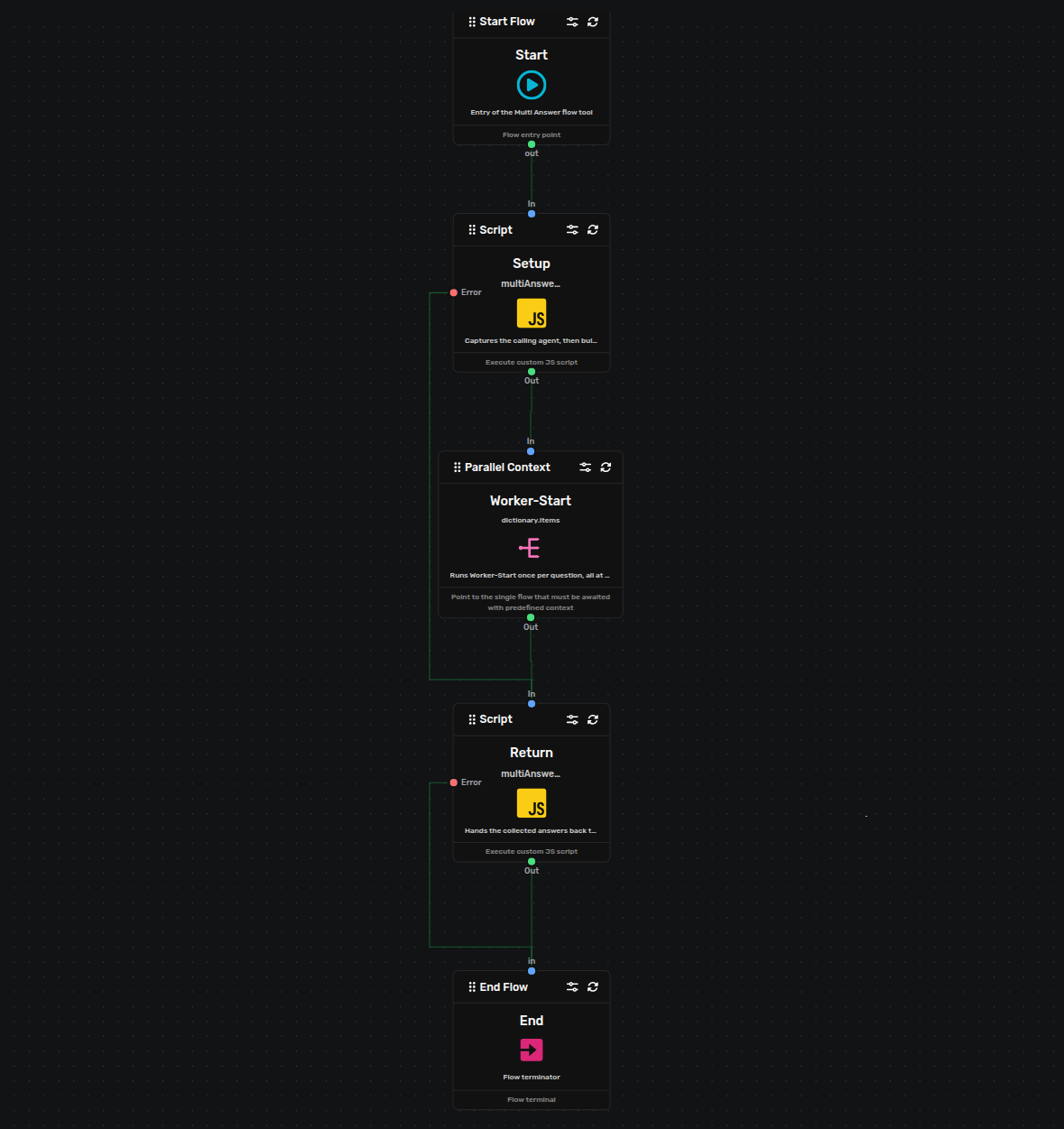
An assembled flow: nodes wired from a Start entry, through the work, to an End.
The Node Types
Every flow is built from a small set of node kinds.
- Agent nodes
- Call a language model. An agent node assembles the conversation and its authored prompts — which may read the flow's working data through
${dictionary.…}/${session.…}placeholders — sends it to the model, and streams the reply back token by token. Their responses flow on to the rest of the graph — or straight back to the end user. (The agent's Json Settings are read by Script nodes, not by Agent nodes — see Script Nodes & Scripts.) - Script nodes
- Run your own JavaScript. Script nodes let a flow do real work — shape data, call out through the platform's provided resources, and read the agent's runtime settings through the
system/settingsresource. They run in a locked-down sandbox with no ambient access to the machine they run on: no filesystem, no direct network, only the capabilities the platform hands them. - Control-flow nodes
- Route the graph. Start and end mark the boundaries of a flow; conditions branch on a value; loops repeat; and parallel nodes fan work out and join the results back. A flow can also run or jump into another flow, so complex behavior is composed from smaller, reusable flows.
Those are the kinds at a glance. Assignment nodes set values into the flow's working memory, and note nodes annotate the canvas for whoever reads it — the full catalog, every node type field by field, lives on the Node Reference page, with how data moves and how scripts are written covered on their own pages.
Isolated Execution
Every node runs in its own sandbox — that is the safety guarantee.
Each node's logic runs inside its own isolated sandbox. A node that throws, loops forever, or exhausts its memory budget is contained: it fails just that node — routing your flow's error path — and can never take down the platform, and never leak into another conversation. Script nodes are sandboxed the same way, with no path to the host beyond the resources the platform provides, which is exactly what makes it safe to run partner-authored code at all.
Concurrency & Reliability
Behavior you can count on when many people chat at once.
- Built for many conversations
- The platform runs a large number of conversations at the same time and stays responsive as load grows. Work is distributed and balanced automatically — you never wire up or think about where a run executes.
- Nothing is dropped under load
- When the platform is momentarily busy, a piece of work waits and is retried rather than discarded. A spike shows up as a brief delay in a response, never as a lost one, and the platform recovers from short disruptions on its own.
- Per-conversation working memory
- Each conversation has its own working memory and session that flow nodes read and write as the graph runs. It is scoped to that one conversation and that one tenant, invisible to any other, and released when the conversation ends.
From a Message to an Answer
What happens between a caller's message and a streamed reply.
- A caller runs an agent by its slug inside a space. The platform authorizes the request — the space must be granted and the agent must exist and be active in it — then starts the agent's flow at its run entry.
- The flow walks node by node. Agent nodes call the model and stream tokens back; script nodes transform data and read runtime settings; control-flow nodes decide what runs next, including branching and running work in parallel.
- Each node executes in its own sandbox against the conversation's working memory. Script nodes and Agent nodes have an explicit error path (the Script node's Error dot, the Agent node's Fallback dot), so a failing script or a failing model call can be handled inside the flow instead of ending the conversation abruptly; a malformed control-flow node — a Condition that cannot be evaluated, a target flow that does not exist — fails the run with an error.
- The reply streams to the caller as it is produced, and the completed exchange is saved to the conversation's history.
agent not found in space. See the Agents page for the naming rules.Good to Know
- Script nodes read the agent's runtime settings only — the partner-facing front settings are never visible to scripts. A value on the wrong channel is simply invisible to the code that expected it.
- An agent's Start Flow and Start Node must name a real flow and its start node in the project you deploy into the space — a name that is valid in shape but absent from the deployed project leaves the agent with nothing to run, so it never responds. Point the agent at the flow you actually build.
- A flow's error path is a first-class part of the design: wire the Script node's Error dot and the Agent node's Fallback dot, and a failure becomes a handled outcome rather than a dead conversation.
- Isolation is per node and per conversation: two conversations running the same flow never share working memory, and a runaway node in one has no effect on the other.
- Because runs are distributed automatically, response time under heavy load degrades gracefully into a short wait — treat an occasional slow first token as backpressure, not a failure.
Keen Agents 2026
Documentation
Release 15