Spaces
The organizational units agents are deployed into — and the boundary partner access is granted against.
What a Space Is
One unit that groups agents and controls consumer access.
An AI Space is KeenAgents' organizational unit for deploying agents: "Spaces are organizational units that group agents and control consumer access." Every agent belongs to exactly one space, and consumer-facing access is granted space-by-space — a partner's consumer contract lists which spaces its consumers may reach, and a consumer's login token carries the space entitlements derived from that contract. When an end user runs an agent, KeenAgents checks both that the token grants the requested space and that the target agent actually lives in that space.
A space itself is small: a stable ID, a title, a description, a deployment token, timestamps, and its list of agents. Creating a space also provisions the storage where its deployed flow-project files live; deleting the space removes those files again. The space's ID doubles as the project ID that chat clients and the deploy client (the Flow Builder extension or the keen-deploy command-line tool) reference.
Core Concepts
- Deployment token
- A credential generated for you when the space is created — the deploy client authenticates deploys into the space with it. It is never chosen by the user, is read-only in the UI (with a Copy button), and can be re-minted with Reset Token. Re-minting takes effect at once for every new deploy connection: a pipeline still holding the old value is refused the next time it connects. A deploy session that was already open when you reset keeps working only until its short session window closes — a matter of minutes.
- Space ID = project ID
- The space's ID is "the stable identifier chat clients and the deploy client reference this space by." It is generated for you, never changes, and is what end-user chat clients pass as the project identifier. The detail page exposes it with a copy button for local project setup.
- Agents in a space
- Every agent is permanently linked to its space. Deleting a space deletes all of its agents with it, and each agent's settings and partner-facing front settings go with them — one delete removes the whole unit, so nothing orphaned is left behind.
- Consumer entitlement
- A partner's consumer contract (managed in the API Keys area) carries a master list of assigned spaces plus default space lists for newly registered consumers; a consumer's issued token is clamped to the contract's spaces. At run time KeenAgents enforces two-stage authorization: the token must grant the requested space, and the requested agent must exist (and be active) inside it. Removing a space from a contract removes it from affected consumers automatically.
- Platform synchronization
- Inside the platform a space or agent change takes effect on its own: the console and the served copy every partner reads are refreshed within seconds of a save, with no action on your part. Partner sites are different — they are not told about space or agent changes automatically. When a partner should pick up a new or changed space or agent, open that partner's Api Key and click Rebuild Resource Cache, then Wake: the Wake notice tells the site to re-read its spaces, agents and agent front settings (see Resource Cache and Webhooks). Space views show only whether an agent has settings; the values themselves live on each agent's settings pages, which keeps space listings fast even with very large settings.
Rules & Limits
The rules behind every form — enforced by the platform as the final authority.
- Title — required, trimmed, maximum
150characters, and unique across the platform: two spaces cannot share a title. - Description — required on create, maximum
500characters, and also unique: two spaces cannot share a description. - Deployment token — generated by the platform at create; users never set it. Reset mints a fresh token and refuses the old one on every new deploy connection from that moment, so a leaked or retired credential can be cut off on the spot (a deploy session already open when you reset runs out its short window of a few minutes).
- Space ID — generated by the platform, immutable, doubling as the project ID referenced by chat clients and the deploy client.
- Organization-wide cap —
20spaces, checked on create only; past the cap the create fails with "Space limit reached — a maximum of 20 spaces is allowed!". Delete a space first to make room. - Delete cascade — deleting a space deletes all of its agents, each agent's settings and front settings, and the space's deployed project files. One action removes the whole unit so no stale agents or files linger.
- Refusals are deliberately general — a refused create, update or delete answers "Not Acceptable" without saying which rule failed: a duplicate title and a duplicate description are not distinguished, so refusals never leak what already exists. The one exception is the space limit, which is named so you can act on it.
- Validation runs at every layer — the form checks the rules before submitting, they are checked again before the request leaves your browser, and KeenAgents itself remains the final authority, so an out-of-date or bypassed form can never write an invalid space.
- Every mutation is recorded in the audit trail — with the requester's identity — a person's email, or an MCP account's id — plus its id and role, so every change is attributable.
Creating a Space, End to End
From the Create form to a synchronized platform.
- Admin opens Spaces → Create Space and enters Title (≤150 chars) and Description (≤500 chars); both are required.
- The form validates the rules on submit, and they are checked once more before the request leaves your browser.
- KeenAgents validates the request, mints the deployment token for you, and creates the space; a duplicate title or description is refused with a general "Not Acceptable" error.
- The action is recorded in the audit trail with the requester identity, and the space's deployed-project storage is provisioned.
- The rest of the platform picks up the new space within seconds. Partner sites are not notified by the create itself — when a partner should see the space, press Rebuild Resource Cache and then Wake on that partner's Api Key.
- The UI shows a success toast and redirects straight to the new space's detail page.
Partner sites learn about your spaces and agents by notify-then-fetch: Wake sends a small notice to the partner's registered notification URL and the site re-fetches the current spaces and agents through its authenticated API access — the notice never carries data, so a delayed or intercepted notice can never carry real content. Ordinary space and agent saves send no notice on their own; Wake is the button on the partner's Api Key page, pressed after Rebuild Resource Cache on the same page.
In the Admin UI
The Spaces section at /spaces.
/spaces/list— table of all spaces with columns Title, ID, Agents Count, and a Visit link to each space's detail page./spaces/create— Title and Description fields with live max-length enforcement (150 / 500), helper texts noting uniqueness, inline field errors, and a server-error line for refusals. Success redirects to the new space's detail page./spaces/[id]— edit form for Title and Description with a dirty-gated Save: it activates only when a value actually deviates from the loaded record, and re-disables after a successful save.- Detail page — read-only Deployment Token field with Copy and — for roles with spaces write — Reset Token buttons, and a read-only Space ID field with a Copy button.
- Detail page — two-step Delete: the button is replaced by a Confirm delete / Cancel pair (no browser popup); deleting navigates back to the list.
- Detail page — Assigned Agents table (Display Name, ID, Active, Start Flow, Start Node) with a Visit link to each agent's own page; hidden when the space has no agents.
- The agents section lists per-space (a space picker drives it) and pre-selects the space when navigated from a space context.
- Detail page — a Rebuild Resource Cache button rebuilds the served copy of all spaces (the same job as Create on the Cache page) without leaving the record. It requires the cache scope's write level — separate from the spaces edit scope — so a cache manager can use it without edit rights, while an editor without cache write never sees it. You rarely need it: a normal save refreshes the copy by itself. To push a change to a partner site use the partner's Api Key page instead — its Rebuild Resource Cache rebuilds only what is bound to that key, and Wake then notifies the site. See Resource Cache.
- Through the Keen MCP server — an AI agent signed in with an MCP account whose role has the spaces scope can do everything on this page with tools of the same names: list and read spaces (a read of one space includes its deployment token), create, rename, delete, and reset the deployment token. The same rules apply — a duplicate title or description is refused, the 20-space limit is enforced, deleting a space takes its agents with it — and the reset and delete tools are flagged as destructive so the assistant confirms with you first.
Keen MCP Server
How an AI agent connects to your organization and what it may do under an MCP account.
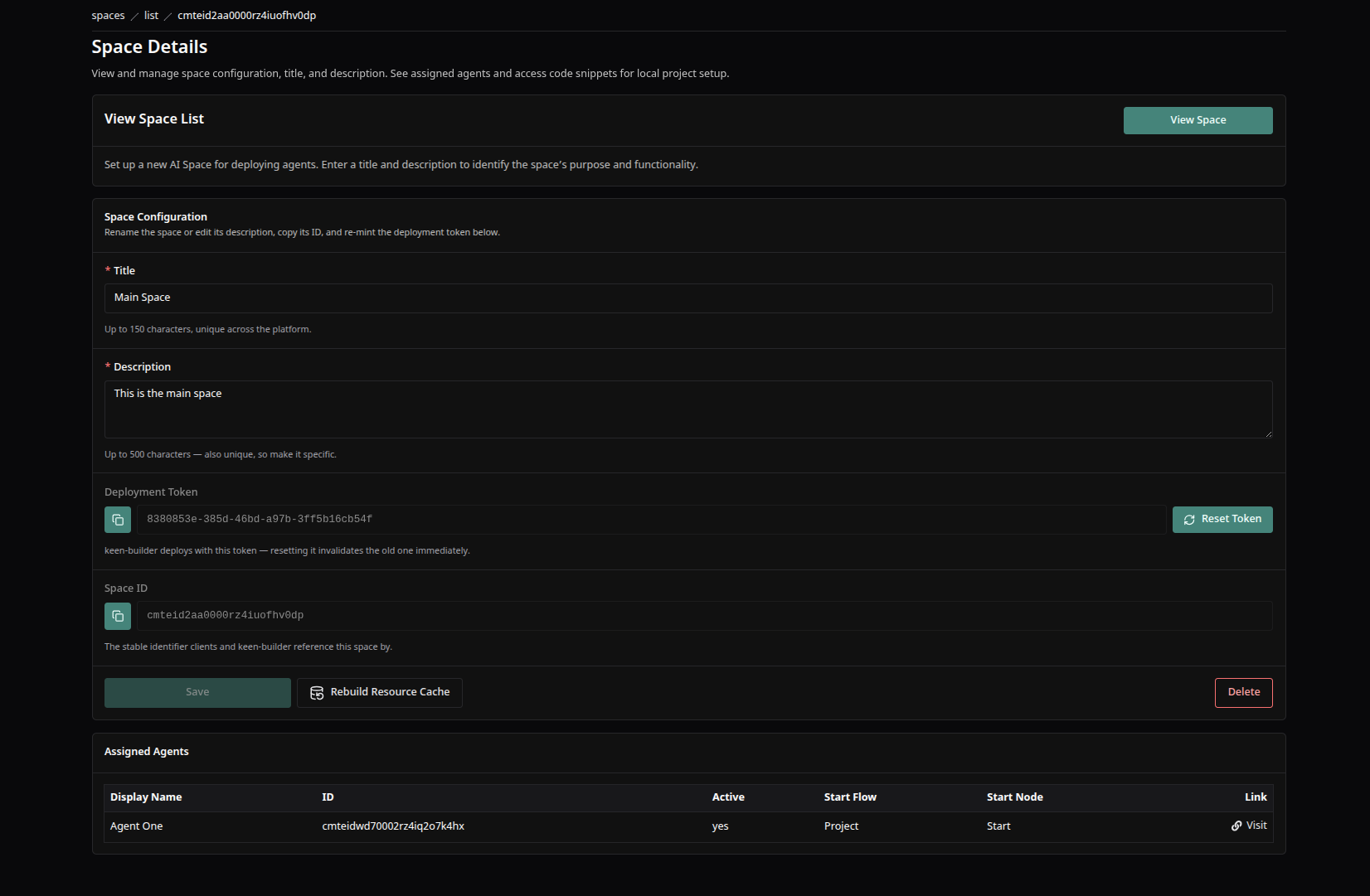
A space's detail screen — title and description, the deployment token and Space ID with copy, and the space's assigned agents.
Good to Know
- Server refusals are undifferentiated — when a create or update is refused, check both the title and the description for duplicates.
- Resetting the deployment token takes effect at once for new deploy connections: any CI pipeline or developer machine still using the old token is refused on its next connect — distribute the new value right away (Copy button on the same field).
- The space ID is also the project ID end-user chat clients pass — running an agent against the wrong space ID is refused as agent-not-found, because authorization requires both space access and the agent actually being in that space.
- Partner sites are told about space and agent changes only by Wake. After adding or changing a space or an agent a partner uses, open that partner's Api Key: Rebuild Resource Cache, then Wake — one notice covers the partner's spaces, agents and agent front settings.
- Views elsewhere in the product converge within a few seconds of a change rather than instantly — if a freshly edited space looks stale somewhere, give it a moment before assuming the change failed.
- Space views only show whether an agent has settings — the actual values (which can be large) are viewed and edited on each agent's dedicated settings pages.
Keen Agents 2026
Documentation
Release 15