Agents
A deployed flow entry inside one space: identity, run entry and activity switch.
What an Agent Is
The runnable identity of a deployed flow.
An agent names a flow entry point inside exactly one space — it is the thing external clients actually run. An agent cannot exist outside a space: the space is chosen at creation, and deleting the space deletes its agents. The record itself is deliberately light — a display name, the agentId slug, the run entry (startFlow + startNode), an active switch and timestamps.
Two identities matter and must not be confused: the generated row id is what admin pages address, while the agentId slug is what clients run by — and the same slug is what an Agent node's agentId setting names inside a flow. So there is just one human-facing id, the slug, used everywhere a flow or a client refers to the agent, and one row id used only by the admin console. Beyond identity, every agent carries two independent settings channels — runtime settings readable by your flow scripts, and partner-facing front settings delivered to partner sites — each capped at 1,000,000 characters. Agent lists stay fast no matter how large the settings grow.
Core Concepts
- Agent
- A deployed flow entry registered inside one space. Fields: displayName, agentId (slug), startFlow, startNode, active, spaceId and timestamps. The flow itself is deployed to the space — the agent tells the platform where that flow starts.
- agentId (slug)
- The platform-wide-unique, kebab-case runtime identity — lowercase letters and single dashes only, no digits. Clients run the agent by this slug, never by the row id. Renaming it changes what a run request resolves to as soon as the save lands — within seconds.
- Row id vs slug
- Admin pages address agents by the generated row id; running an agent uses the slug. Passing the row id where the slug is expected fails the run with
agent not found in space. - Run entry
- KeenAgents derives the flow entry point by dash-joining
startFlow-startNode(for exampleMainFlow-Start). Both names are strict PascalCase with letters and digits only — a dash inside either name would corrupt the join, which is why dashes are forbidden. - Active flag
- Boolean, defaults to true. KeenAgents refuses runs of an inactive agent — flipping the switch off takes an agent out of service without deleting it.
- Agent Json Settings
- The runtime channel: custom fields your flow scripts read at run time through the
system/settingsscripting resource. Saved on its own page, never delivered to partners. - Front Agent Settings
- The partner channel: configures how the agent appears on the partner's site, delivered to partner integrations through the partner API and never exposed to scripts. A front save does not touch the agent record or the runtime settings.
Rules & Limits
Exact validation — the platform is the authority; the UI mirrors it for fast feedback.
- Display Name — required, 3–150 characters. The form only enforces non-empty + max 150, so a 1–2 character name passes the form and is refused on save.
- Agent ID —
^[a-z]+(-[a-z]+)*$: lowercase letters in single-dash-separated words, no digits, no leading/trailing/double dashes; 3–100 characters; unique across the entire platform. The input sanitizes as you type — uppercase is lowercased, digits and spaces never enter the field. - Start Flow / Start Node —
^[A-Z][A-Za-z0-9]*$: strict PascalCase, letters and digits only, 3–60 characters each, no dashes — the run entry is derived by joining them with a dash, so an internal dash would corrupt it. - Settings channels — max
1,000,000characters each; the live counter in the editor mirrors exactly the limit enforced on save. Saving an empty value legitimately clears the settings. - Settings write isolation — a general agent update cannot carry settings: a request that tries is refused, and only the two settings surfaces write them — the Json Settings and Front Settings pages in the console, or the matching tools when an AI agent works through the Keen MCP server. An agent-record edit can therefore never overwrite a settings save.
- Field ids inside the settings —
^[a-z][a-z0-9]*(-[a-z0-9]+)*$(kebab-case, digits allowed here, unlike the agent slug) and unique among the rows. Required is type-relative: 0 is a real number, false is a real boolean, but an untouched rich-text value (<p></p>) counts as empty. - Per-space cap — an agent always belongs to exactly one space, and each space holds at most
10agents (a per-space limit, not an organization-wide number). Past the cap a create is refused with "Agent limit reached — a maximum of 10 agents per space is allowed!"; need more, deploy into another space. - Cascade — an agent belongs to exactly one space: deleting the space deletes its agents, and deleting an agent removes both of its settings sets with it. There is no orphaned-agent state and no undo.
- Refusals — a refused agent operation answers a general "Not Acceptable" with no reason attached: a duplicate slug and an unknown id look identical, so a probing caller learns nothing about what exists. Two things are named: the per-space limit, and a value that breaks a format rule — its message names the field and the rule exactly as the form does.
Both channels store a set of typed field rows — { displayName, fieldId, fieldType, required, value, valid }:
| fieldType | Editor | Notes |
|---|---|---|
input | Single-line input | The default type |
text | Textarea | Multi-line plain text |
richtext | Rich-text editor | An untouched value counts as empty for a required field |
number | Numeric input | 0 is a valid required value |
password | Masked input | Masked in the editor |
boolean | Checkbox | false is a valid required value |
array | List of string items | Value is a list of strings |
From Create to Run
What happens between filling the form and a client getting an answer.
- Pick the space — an agent cannot exist outside one. Arriving from a space's detail page pre-seeds the select via the
?space=URL parameter. - Type the Display Name; the Agent ID auto-fills as its kebab-cased form until you edit the ID by hand — after that the auto-follow stops for good, the slug is yours.
- Enter Start Flow and Start Node — the run entry becomes
StartFlow-StartNode(for exampleMainFlow-Start). - Submit. The same rules are validated in the form and again before the request leaves, and KeenAgents enforces slug uniqueness on save. On success the agent is known across your organization within seconds and can be run as soon as its project is deployed; the UI redirects to the new agent's detail page. Partner sites are not notified by the create — when a partner should see the agent, open that partner's Api Key: Rebuild Resource Cache, then Wake.
- A client runs the agent by its slug: KeenAgents looks it up inside the requested space — not found in that space, or inactive, and the run is refused — then starts the flow at the derived entry.
- Scripts inside the flow read the runtime settings as a flat
{fieldId: value}map (valid rows only) throughsystem/settings; front settings stay unreachable from scripts.
In the Admin UI
/agents— Agent Management landing, with cards leading to Create and List./agents/list— space-scoped: a space picker at the top, and?space=<id>in the URL is the source of truth (refresh, shared links and back/forward land on the same view); nothing is fetched until a space is chosen — there is deliberately no cross-space agent list. Columns: Display Name, Agent ID, Entry, Status (Active / Inactive) and a Visit link./agents/create— the create form: required Space select, Display Name with slug-follow into Agent ID, input-level sanitization on the ID, and the PascalCase hint on Start Flow / Start Node./agents/<id>— Agent Details: a cross-link card to the owning space, the Active switch (inactive agents are refused at run time), the Agent ID with copy-to-clipboard and the rename warning, Save gated on real changes (dirty check), and a two-step Delete (Delete → Confirm delete) returning to the space's agent list./agents/<id>/json-settingsand/agents/<id>/front-settings— one shared settings card per channel: the settings row builder (read-only row summaries; all editing happens in a Definition modal and a per-type Value modal), a valid/invalid badge, a live character counter ("N / 1,000,000 - allowed characters", red over the limit), and Update Settings enabled only when valid and under the limit and changed from the load-time baseline./agents/<id>— a Rebuild Resource Cache button rebuilds the served copy of all agents (the same job as Create on the Cache page) without leaving the record. It requires the cache scope's write level — separate from the agents edit scope. You rarely need it: a normal save refreshes the copy by itself. To push a change to a partner site, use the partner's Api Key page: Rebuild Resource Cache there rebuilds only what is bound to that key, then Wake notifies the site. See Resource Cache.- Through the Keen MCP server — an AI agent with the agents scope can list a space's agents, read, create, update (rename, re-point the run entry, toggle Active) and delete agents, and read or write both settings channels — the runtime Json Settings and the partner-facing Front Settings — as a whole blob at a time. Identity rules are identical: the slug is lowercase letters and single dashes (up to 100 characters), Start Flow and Start Node are PascalCase (up to 60), and the tools address an agent by its record id, not its slug.
Keen MCP Server
How an AI agent connects to your organization and what it may do under an MCP account.
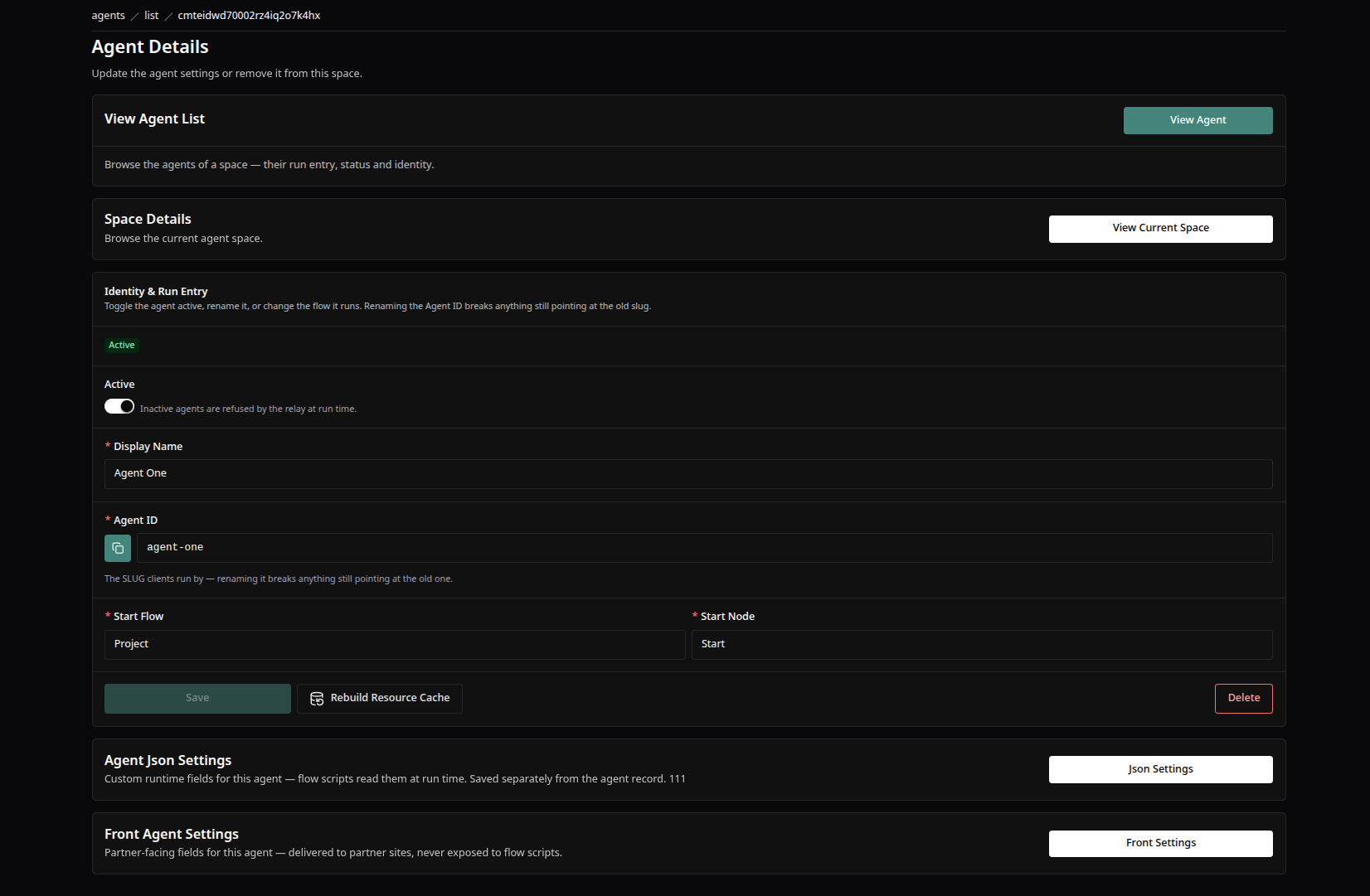
The agent detail screen — display name, the agentId slug with copy, the run entry, the Active switch, and Save and Delete.
Good to Know
- The two settings channels are strictly isolated in both directions: front settings are never readable by flow scripts, runtime settings are never delivered to partner sites. A value on the wrong surface is silently invisible to its intended consumer.
- A front-settings save changes only the front channel — the agent record, the runtime settings and the
hasSettingsflag are untouched. Like every other agent change, it reaches partner sites only through Rebuild → Wake on the partner's Api Key. - Consumers skip rows stamped
valid: false. You can save a set containing invalid legacy rows (the editor blocks only new violations) — those rows simply never reach scripts or partners. If a field "isn't showing up" at run time, check its valid stamp first. - Changing a field row's type in the definition modal resets that row's value to the new type's blank — the modal warns before you commit.
- Agent list responses never carry the settings themselves — only
hasSettings: boolean, and it tracks the runtime channel only. The settings travel exclusively through their dedicated settings pages. - The UI's minimum lengths are looser than the platform's on Display Name and Agent ID: a 1–2 character value passes the form but KeenAgents requires 3 and refuses with the general "Not Acceptable".
- Clearing settings with an empty value never makes the agent look deleted — KeenAgents distinguishes "agent exists with no settings" from "unknown agent".
Keen Agents 2026
Documentation
Release 15