Contracts
Per-tenant rules for a partner's consumers: registration, OTP, login blocking and AI space assignment.
The Tenant Contract
One contract per partner: identity, policy and space assignment in a single record.
A consumer contract defines how one partner's consumers may use KeenAgents. It answers three questions: who they are (a name plus a 19-character tenant key, unique across the whole platform), what they may do (five policy toggles covering registration, OTP and login blocking), and which AI spaces they may use (a master set plus two default lists). A contract is bound 1:1 to at most one API key — the binding is set from the API key side, via the "Pick a consumer contract" dropdown on the API key form.
Consumers belong to their contract. Every consumer registered under a contract stays attached to it for its whole life: the contract's policy governs how the consumer signs in and its allowed-spaces set caps what the consumer may use. Deleting a contract does not delete its consumers — they are released into an unassigned state and an admin re-assigns each one to a contract from the consumer's own page. Contract changes notify the partner on their own; use the key's Rebuild Resource Cache → Wake when you want the whole partner configuration pushed again.
Core Concepts
- Contract key
- Exactly 19 alphanumeric characters (
^[A-Za-z0-9]{19}$), unique across the platform. Either admin-supplied or auto-generated when omitted at create. The key is the tenant identity the partner holds — consumer sessions are minted under it, which is why re-keying acts as a per-tenant kill-switch (see below). - Space sets
- The master
spacesset is what the contract may offer. Two default lists — spaces auto-assigned to system-registered and to outside-registered consumers — are enforced subsets of the master set. Defaults shape future registrations; the master set governs everyone on the contract. - Partner notifications
- Notifications reach the partner through the Webhook entry bound to the same API key, not through the contract itself. Every contract change — name, key, spaces, defaults, policy — automatically sends that URL an
r_consumer_policynotice; deleting the contract sendsr_consumer_policy_delete. The notice carries no data: on receipt the partner re-reads the contract and policy over the authenticated API. To be certain a partner holds everything fresh at once, press Rebuild Resource Cache and then Wake on the key. - API key binding
- A contract can be bound to at most one API key; deleting the contract clears the key's binding rather than deleting the key. While no contract is bound, KeenAgents refuses to mint application tokens for that key — the binding is a hard prerequisite for partner access.
Reading Your Contract Over the API
Two partner-facing reads — the contract's identity and spaces, and its live policy — both scoped to your own key.
A partner never changes a contract over the API — that is the admin's job — but it does read two resources from it, both authenticated with your application token and served scoped to the api key that token was minted for. You only ever see your own tenant's contract. Both are the notify-then-fetch targets an r_consumer_policy notice (or a Wake) nudges you to re-read.
Paths shown as /v1/… are reached at https://<your KeenAgents host>/keen-api/… — the /v1 prefix is replaced by /keen-api.
GET /v1/resources/consumer-contract — your identity + the ids of the spaces you may use
GET /v1/resources/consumer-contract Authorization: Bearer <application_token> Origin: https://your-site.example → 200 { "success": true, "status": 200, "message": "Success", "result": { "id": "…", "apiKeyId": null, // always null on this read "name": "Acme Store", "key": "aB3dE7gH1jK4mN6pQ9r", // your 19-char tenant key "createdAt": "2026-01-14T09:22:03.114Z", "spaces": [ { "id": "…", "title": "" } ], // ids only — titles come from GET /v1/space/list "outsideRegistration": true, // the five policy booleans here are fixed "otpInsideRegistration": false, // placeholders (outsideRegistration true, "otpOutsideRegistration": false, // the rest false) — use consumer-policy "blockOutsideRegistrationLogins": false, // below for the live values "blockSystemRegistrationLogins": false } } // no contract bound to your key yet: → 200 { "success": true, "status": 200, "message": "Success", "result": null }
GET /v1/resources/consumer-policy — the LIVE registration / login policy
GET /v1/resources/consumer-policy
Authorization: Bearer <application_token>
Origin: https://your-site.example

→ 200 {
  "success": true,
  "status": 200,
  "message": "Success",
  "result": {
    "id": "…",                                      // your consumer contract id
    "key": "aB3dE7gH1jK4mN6pQ9r",
    "outsideRegistration": true,
    "otpInsideRegistration": true,
    "otpOutsideRegistration": true,
    "blockOutsideRegistrationLogins": false,
    "blockSystemRegistrationLogins": false,
    "defaultSystemSpaces": [ "…" ],
    "defaultOutsideSpaces": [ "…" ]
  }
}

// no policy bound to your key yet:
→ 200 { "success": true, "status": 200, "message": "Success", "result": null }
outsideRegistration true, the rest false) — treat it as authoritative only for the contract's identity and its space ids. For the live registration and login rules — including the two default-space lists new consumers receive — read /v1/resources/consumer-policy.Failure modes — both reads
- 200 · result: null
- Not an error. Your api key has no contract (or policy) bound yet — the request succeeded and returned an empty result. Wait for the admin to finish binding, then re-read.
- 401 Unauthorized
- A message naming the problem —
Missing or malformed Authorization header,Invalid token(bad signature),Token api_key no longer valid(the key was deleted or is no longer fully bound) orToken client_id no longer matches binding(the key was re-bound to another client). Mint a fresh application token and retry. - Connection reset / no reply
- No descriptive error at all — the request's
Originheader is not on the allow-list, so the connection is dropped silently (on your side it surfaces as a generic proxy error). Check the Origin your site is served from matches the one registered on your webhook entry.
The Five Policy Toggles
Submitted as a full replace-set — always all five, never a patch.
| Flag | Default | What it governs |
|---|---|---|
outsideRegistration | true | Allow partner-side consumer registration. |
otpInsideRegistration | true | Require OTP for system-registered consumers. |
otpOutsideRegistration | true | Require OTP for outside-registered consumers. |
blockOutsideRegistrationLogins | false | Block logins for outside-registered consumers. |
blockSystemRegistrationLogins | false | Block logins for system-registered consumers. |
Rules & Limits
- Name: required,
1–100characters, unique. - Key: exactly
19characters matching^[A-Za-z0-9]{19}$, unique across the platform; auto-generated when omitted. A bad shape is refused withKey must be exactly 19 characters from A-Z, a-z and 0-9. - Org-wide cap:
20contracts, checked on create only — one past the cap returns 400 with aReached the maximum number of …message; delete one first. The cap keeps each organization's partner surface small enough to audit at a glance. - Policy updates submit all five toggles as a full replace-set — there is no partial patch, so the saved policy is always exactly what was last submitted.
- Space assignment bodies are a
spaceIdsarray of up to200entries with replace-all semantics (the full desired set, not a delta). An unknown space id → 400 (Unknown space: …); a default list that is not a subset of the master set → 406 (Default spaces must be a subset of the contract's assigned spaces.). - There is no rotate action for contracts — but editing the key is effectively a rotation (see the warning below).
- Refresh notices are best-effort and delivered once, without retries. Because they carry no payload, a missed notice costs nothing that a re-fetch of the contract does not recover — never act on the notice itself.
- Contract changes take effect immediately, everywhere across the platform.
What Changing a Contract Does
Replacing the master space set, step by step.
- The admin replaces the contract's master
spacesset (replace-all, up to 200 ids; every id must be a known space). - Both default lists are automatically pruned down to the new master set, so the subset rule always holds.
- A space removed from the master set stops being usable at once: every chat run is checked against the contract's current spaces, so a consumer who was granted that space earlier is refused for it from the next run on — no re-login needed. The consumer's own granted-spaces list is not rewritten; re-adding the space to the contract restores access.
- The partner's notification URL automatically receives an
r_consumer_policynotice and re-fetches the contract. To push the whole partner configuration at once, press Rebuild Resource Cache and then Wake on the bound API key. - Editing only a default list does not affect existing consumers — defaults shape future registrations only.
In the Admin UI
Where contracts live and what the forms enforce.
- Contracts are their own entry in the sidebar's Api group, gated by the Contracts scope — read to view contracts, their spaces and policies; write to create, edit, delete and set policy and spaces.
- The detail page has three cards. Identity & Key: the editable name; the 19-character Key field (copy button) — typing a different key turns Save into a red Confirm key rotation with a Keep current key escape, because it signs the whole tenant out; read-only Contract ID, Bound API Key and Webhook (the notification URL riding on the bound key). Registration & Login Policy: five rows — Partner sign-up, One-time code — consumers created in-app, One-time code — consumers who signed up on a partner site, Freeze partner-registered consumers, Freeze in-app-created consumers — with their own Save Policy button. Spaces: one table with Assigned (the master set), In-app default and Partner default columns; a default switch stays disabled until the space is Assigned; its own Save Spaces button. There is no Generate button — leave the key empty at create to have one minted.
- The binding is made on the API key form — its "Pick a consumer contract" dropdown offers unassigned contracts plus the currently bound one on Edit.
- Guardrails surfaced by the forms: the 20-per-resource cap, unique names and keys (refused with a friendly 400 and a clear message), and the defaults-must-be-subset rule (the board will not let you default an unassigned space; the platform answers 406 if one slips through).
- A Rebuild Resource Cache button in the footer rebuilds the served copy of all contracts — both the contract data and the consumer policy (the Cache page has no card for contracts — this button is the only place to do it). It appears only for roles with Cache write. You rarely need it — a save refreshes the copy on its own; to refresh everything one partner reads, use the API key's Rebuild Resource Cache (the cascade) and then Wake.
- Also available to an AI agent through the Keen MCP Server:
list_consumer_contracts,get_consumer_contract,list_contract_spaces,create_consumer_contract,update_consumer_contract,update_consumer_contract_policy,assign_contract_spaces,assign_contract_default_system_spaces,assign_contract_default_outside_spaces,delete_consumer_contract— same scope, same rules.
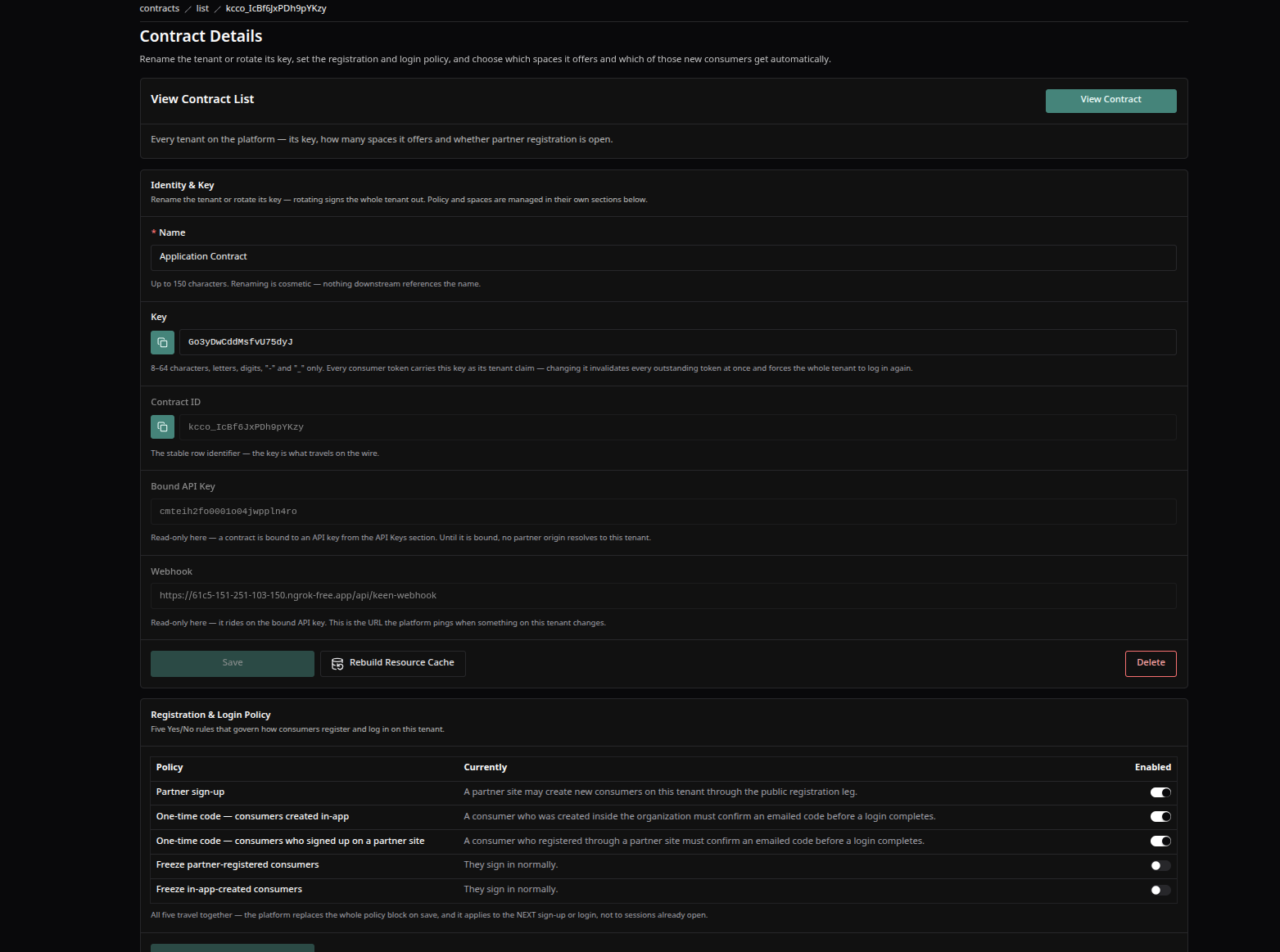
A consumer contract's detail screen — the Identity & Key card with its Save · Rebuild Resource Cache · Delete footer, the Registration & Login Policy board, and the Spaces board.
500 Invalid request until a contract is re-bound; the partner also receives an r_consumer_policy_delete notice so it can drop its stored contract. The contract's consumers are not deleted: they are released into an unassigned state, cannot sign in through any partner site, and wait for an admin to re-assign each one from the consumer's own page.Keen Agents 2026
Documentation
Release 15