9. Advanced — manual chat I/O via Script Nodes
The responses you receive in the chat UI are the ones that match the Agent ID of the Agent Node in the flow. If you connect another Agent Node, you won't be able to see its responses in the chat UI unless you use a Script Node.
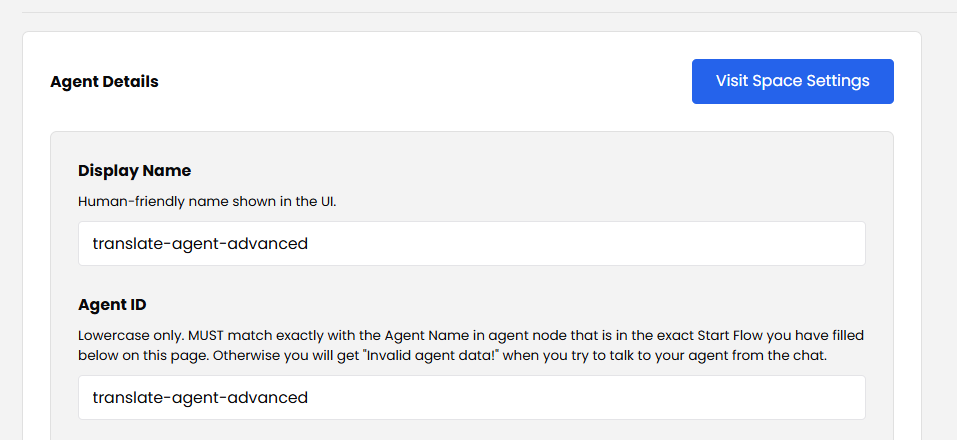
Technically, you can input an Agent ID that doesn't match an actual Agent Node in the flow. In this example the Agent ID in the administration was changed to translate-agent-advanced:
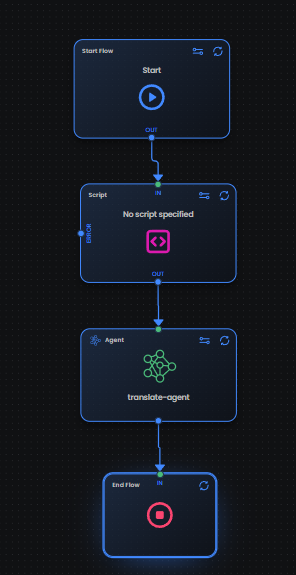
Then you have to output messages in the chat UI manually through scripts, and take user input from the chat manually through scripts as well. To take the user input, you have to add a Script Node:
For the Script Node APIs that drive this pattern, see:
- Script Node — Chat API —
ChatMgr.writeOut,writeThinking,writeError(interim status to the chat UI). - Script Node — Agent API — read/write the prompt and response stack.
Other system/* resources
A script may import any of the live system/* resources to reach host capabilities — the isolate itself has no network and no console:
system/chat— interim status messages to the chat UI.system/log— lines to the Organization's log viewer (/org/logs).system/session— the run-wide shared key/value store (capped at 1.5 MB).system/tools— small runtime utilities (generateUUID(),getTimestamp()).system/agent— the agent prompt/response stacks (see below).system/cookies— read-only access to the consumer's request cookies.system/http— outbound HTTP (the host runsfetchand streams the body back; public hosts only, SSRF-guarded).system/dictionary— a read-only, scoped read of another flow's dictionary.
system/http,system/agentreads, andsystem/dictionaryshare one host buffer, soawaiteach call — firing two at once withPromise.allfails (E_SAB_BUSY).
Channel-based agent state
system/agent stores each agent's prompts and responses newest-first, scoped to the connection. Entries default to the root channel, but you can also use named channels — orthogonal lanes that span every agent:
getChannelPrompts(channel)/getChannelResponses(channel)— read one channel across all agents.consumeChannelPrompts(channel)/consumeChannelResponses(channel)— read and delete (drain) a channel.deleteChannel(channel)— delete a channel's prompts and responses.
A channeled entry lives only in its bucket — the per-agent reads (getAgentLastResponse, etc.) see the root channel only and will not pick it up.